

Last updated: April 2026
If someone forwarded you an article about ADA website lawsuits and you’ve been quietly worried ever since—this guide is for you. Whether you run a construction company, a nonprofit, a yoga studio, or a local grocery, no technical background needed. No scare tactics. Just clear answers.
First: What Is Web Accessibility, and Why Does It Matter for Those Using Assistive Technologies?
Web accessibility means making sure your website can be used by people with disabilities—things like visual impairments, hearing loss, motor difficulties, or cognitive differences. In practice, this means things like: can someone who is blind use a screen reader to navigate your site? Can someone with tremors in their hands fill out your contact form using only a keyboard?
For most small Bay Area businesses—a general contractor, a church, a nonprofit childcare center, a local market—your website probably has a homepage, a services or programs page, a photo gallery, and a contact form. That’s it. The good news is that simpler sites are generally easier to make accessible.
The bottom line up front: The ADA (Americans with Disabilities Act) has been interpreted by courts to apply to business websites. Lawsuits targeting small businesses are real and increasing. But the fixes for web pages are not complicated or expensive—and most web developers can handle them in a few hours if they know what to look for.
Why Are Businesses Getting Sued? Often Due to Failures in Providing Equal Access
The ADA was written in 1990, before the internet existed. It doesn’t mention websites. But courts—including in California—have consistently ruled that if your business has a physical location or offers services to the public, your website is covered by the ADA as an extension of that business.
Since there’s no single federal law that says “your website must do X by Y date,” many businesses have done nothing. That gap has been filled by a wave of lawsuits—often filed by a small number of law firms that specialize in ADA website cases and target businesses with obvious barriers on their sites.
Who gets targeted? Automated scanning tools can check thousands of websites a day for disability-related barriers. A construction company with a PDF brochure that can’t be read by screen readers, a nonprofit with low-contrast text on its donation page, or a restaurant with images and no descriptions are all easy targets. Plaintiffs don’t need to prove they were a genuine customer—only that they encountered a barrier.
California businesses face double exposure. Federal ADA claims plus state Unruh Civil Rights Act penalties, which can exceed federal damages. A California-based business that ignores accessibility is exposed on two fronts.
What Does a “Compliant” Website Actually Look Like?
The standard courts look to: Level AA
The Web Content Accessibility Guidelines (WCAG) are the internationally recognized benchmark for building an accessible website. Courts and regulators have settled on WCAG 2.1 Level AA as the practical accessibility standard. Following these guidelines is considered best practice for any business with a public-facing website. You don’t need to memorize the details—just know the acronym so you can ask your web developer about it.
Plain-English Glossary
WCAG — The international standard for making websites usable by people with disabilities. Think of it like a building code—but for websites.
Level AA — The middle tier of the guidelines. Not the bare minimum, not perfection. The level courts consider “reasonable compliance.”
Screen reader — Software (like Apple’s VoiceOver or NVDA) that reads website content aloud for people who are blind or have low vision.
Alt text — A short text description of an image that screen readers read aloud. Without alt text, a blind user just hears “image” or nothing at all.
Color contrast — The difference in brightness between text and its background. Low color contrast (light gray text on white) is hard to read for many people with visual disabilities.
Keyboard navigation — The ability to move through a website using only the Tab and Enter keys, without a mouse. Essential for people with disabilities affecting motor control.
What Should You Actually Do? A Simple 5-Step Plan to Improve Your Website’s Digital Accessibility
In order of priority:
1. Run a free automated scan today. Go to wave.webaim.org, type in your website address, and hit enter. It’s free and takes 30 seconds. It will flag missing alt text, color contrast issues, and other disability-related barriers on your site with plain explanations. Screenshot the results.
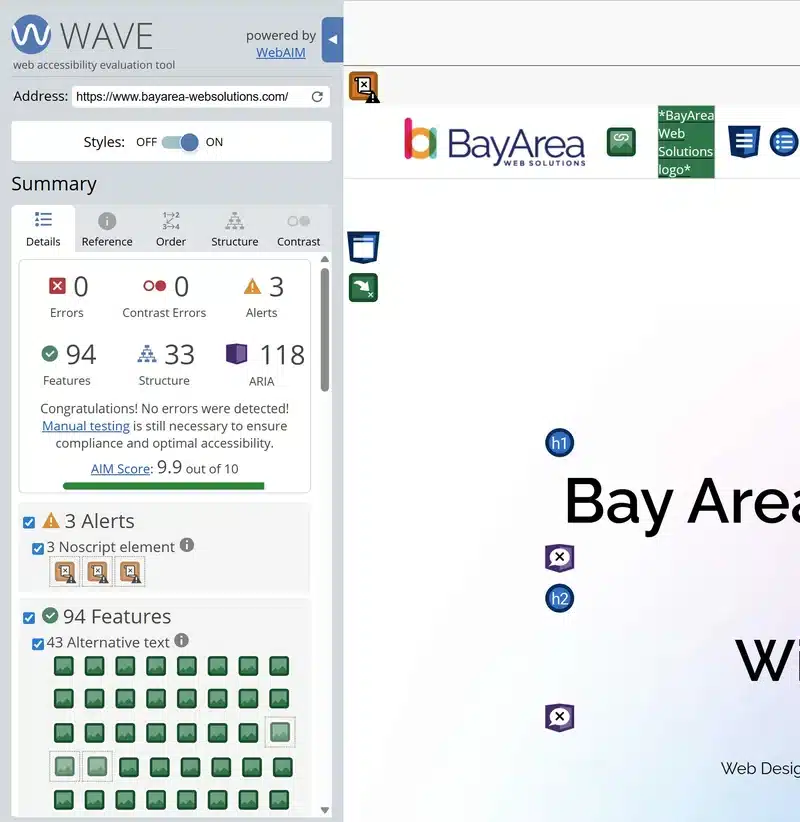
2. Ask your web developer about Level AA compliance. Forward them the scan results and ask: “Can you fix these and confirm the site meets WCAG 2.1 Level AA?” A developer who specializes in accessibility will know how to fix what the scan finds. If they don’t know what the standard means, it may be time to find someone who does — like a Bay Area web designer with accessibility experience.
3. Fix your PDFs. Scanned PDFs—like a photograph of a document—are completely invisible to screen readers. If your site links to a PDF price list, intake form, or any document, it needs to have actual selectable text. Ask your developer or a PDF specialist to “tag” your PDFs for digital accessibility.
4. Add an Accessibility Statement to your website. A short page that says “we are committed to making our website accessible to people with disabilities, here’s the standard we aim for, and here’s how to contact us if you encounter a problem.” Courts look favorably on businesses that show good faith effort. This takes about an hour to add.
5. Schedule an annual check. Accessibility can break when you update your site—a new photo without alt text or a new form field added by a plugin can quietly undo your progress. Put a note in your calendar to re-run the WAVE scan every 12 months, or whenever you make significant changes to the site.
One thing not to do: avoid overlay widgets
Don’t install an “accessibility overlay widget”—a small toolbar that appears on your site claiming to make it accessible. Tools like AccessiBe and similar overlays are widely considered ineffective by accessibility experts. In many cases they leave key pages inaccessible to screen reader users, and they have appeared in lawsuits as evidence of inadequate compliance. They are not a substitute for fixing the underlying code. If someone has sold you one of these, it’s worth having a real audit done.
Common Questions From Small Business Owners
We’re a small construction company / nonprofit / local retailer. Do we really need to worry about this? Yes, if you have a public-facing website and serve clients or customers in California. Business type and size are not legal exemptions — any business can face an ADA claim. That said, a small, simple site is usually much cheaper and faster to bring into compliance than a large e-commerce platform. Most small business sites can reach a good level of compliance for a few hundred dollars of developer time.
How do I know if I’ve already been scanned by one of these plaintiff law firms? You generally won’t know until you receive a demand letter. The best defense is to fix obvious issues proactively — the automated scans that plaintiff firms use will pass over sites with no glaring failures. You don’t need a perfect score; you need to not be an easy target.
What happens if I receive a demand letter? Don’t ignore it, and don’t panic. Contact an attorney experienced in ADA defense — many demand letters are sent hoping for a quick settlement. Courts generally look favorably on defendants who respond promptly, make good-faith improvements to their site, and can demonstrate they followed best practices toward compliance. Document everything you’ve done.
Is there a government deadline I’m missing? The DOJ finalized a rule in 2024 requiring state and local government websites to meet WCAG 2.1 AA by specific dates. Private businesses like contractors, nonprofits, and local retailers are not covered by that specific rule — but courts continue to apply ADA requirements to private business websites. There’s no deadline to wait for; the legal exposure exists now.
How much does it cost to fix? For a typical small business site — a few pages, a contact form, maybe a photo gallery — expect to pay a developer between $300 and $1,500 to address the main issues, depending on how many problems the scan turns up and how the site was originally built. An ongoing annual check is usually much cheaper since you’re maintaining rather than rebuilding.
The Honest Summary
Web accessibility for a small business is not a massive technical project. It’s a set of specific, fixable disability barriers on your website that don’t meet current accessibility standards — most of which your existing web developer can handle if you point them in the right direction. The risk of doing nothing is real and growing, particularly in California.
The most important thing you can do today: run the free WAVE scan on your site, look at the results, and forward them to whoever manages your website with a simple note: “Can we get this cleaned up to meet WCAG 2.1 AA?”
That one email puts you significantly ahead of the majority of small businesses who have never thought about disability access on their website at all.
Accessibility Services
We help Bay Area businesses get this right. Whether you need a full accessibility audit or just want someone to point your developer in the right direction, we can help.
- Audit and reporting — a clear picture of every barrier and what needs fixing
- Assistive technology testing — real-world screen reader and keyboard navigation testing
- Code remediation — working with your developer to fix underlying issues at the source
- Training and documentation — so your team keeps the site accessible going forward
Contact us to learn how we can improve the user experience for all your visitors and make your website accessible to everyone.
About the author: Jason Garvey has been building websites for Bay Area small businesses since 2005. Based in San Mateo, he works personally with 100+ clients across the Bay Area — no account managers, no handoffs. He offers web design, WordPress hosting and maintenance, and web accessibility audits for small businesses throughout the Bay Area.